Where to Get PSV LAC and Account Number
Where Can I Find My LAC (License Activation Code) In PrintSmith Vision

Step-by-Step Video Guide
Step-by-Step Instructional Guide
Log into PrintSmith
- Use an admin account, or the user "admin" to log into PrintSmith.
Access the Menu
- Once logged in, click on the Three Lines/Hamburger Menu icon located at the top left of the screen.
Navigate to Licensing
After clicking the menu icon, a side panel will appear. Scroll all the way to the bottom of this panel, where you should see a hyperlink labeled "Licensing".
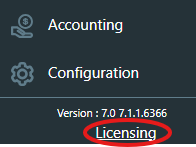
 In some cases, the button may not appear for you even if you have admin privileges. If you do not see the Licensing button, please log into the "admin" username.
In some cases, the button may not appear for you even if you have admin privileges. If you do not see the Licensing button, please log into the "admin" username.
Retrieve the LAC
A box will appear in the middle of the screen. At the top of this box, you will find "LAC" followed by a long set of numbers and letters.
Copy and paste this LAC for your records.
Where Can I Find My Account Number In PrintSmith Vision
- The only place to get an Account Number is from an invoice billed to you directly from EPS / PrintSmith. Take a look at the screenshot below on where it is located on the invoice:
If you do not get these invoices sent to you / do not have access to them, it is completely fine. Simply let us know, and we can communicate with the corresponding parties to get it. Keep in mind however, we will need the LAC to find its corresponding Account Number.
Have any questions? Please feel free to contact Bristol Pay through phone or email at:
877-673-4876